
Must read before upgrading:
① If the sound quality of the factory version meets your requirements, you don't need to upgrade the software version. (Switching versions multiple times may cause compatibility issues)
② Before upgrading this version, please make sure your factory software version is less than V143. (Press and hold the button on the right side of "surround" for 5 seconds) (Not suitable for V018/ V019 or T20/T019、V44 & V45 with App control new version )
③ Please ensure that the soundbar and the subwoofer remain connected before upgrading. Otherwise, the software versions will be inconsistent, and the subwoofer will have no sound or will not work.
④ If the device crashes and cannot be turned on after the upgrade, please contact customer service to send a "recovery file", please get in touch with support@ultimea.com.
V139 installation download: update.zip
V139 improvements:
① Adjusted the mid-frequency for clearer sound
② Added BASS level: adjusted from -2~2 to -6~6, a total of 13 levels
③ Added Surround level: adjusted from -2~2 to -3~3, a total of 7 levels
④ Soundbar volume adjustment changed from 0-40 to 0-100 levels
⑤Optimize EQ1/EQ2/EQ3 sound effects
Specific Method:
1. Copy the "update.zip" file to the USB flash drive.
Note:
① Use an empty USB flash drive, USB format: FAT32, 128GB or less capacity;
② The file doesn't need to be unzipped;
2. After the Soundbar is turned on, insert the USB flash drive into the USB port, WAITING will be displayed, and then it will automatically upgrade and the progress will be displayed. Automatically standby after the upgrade is completed.
3. Press and hold the button on the right side of "surround" for 5 seconds. If the display shows "V139", it means the upgrade is successful.
If you have any questions after downloading, please feel free to contact us, and if you have any suggestions or ideas
Please note:
This software version is only compatible with Poseidon D60 that do not support the Ultimea App.
For the 2025 new version Poseidon D60 that supports the App, please get the latest software version update in the Ultimea App.
Please do not download the wrong software, as doing so may cause the device to malfunction.
- update.zip5 MB
Comments
104 comments
You can downgrade it thats not the problem . But i see that different TV are different problems so you habe to test it whats the best for you
the real problem is the impossibility of not being able to set a different volume of the soundbar compared to the rear speakers/sub wooferI am back to v83. I think its better than other versions even with its quirks. I will monitor future releases and upgrade accordingly.
Is T20 the last version that owners with factory version Vo18 or V109 can expect? If so please let us know so we can move on. Thank you.
Hello to everybody!
After reading most of the comments, I should like to ask a few questions concerning my Poseidon D60.
1) where/how can I see which the software version of my Poseidon D60 is??
2) In the supplied concise printed sheet/manual in the box there are only 3 EQ presets Movie, Dialogue and Music: EQ01, EQ02 and EQ03.
BUT IN THE DOWNLOADED MANUAL FROM THIS SITE THERE IS ANOTHER SEQUENCE written: music mode Eq01 and movie mode Eq03 ??!!
So which is really correct ???
I suppose EQ2 is for dialogues and TV shows.
But which setting is for movies and which for music??
3) In the bass settings: does -1 mean least bass and 1 most bass sound?
4) In the surrond sound settings -1,0 and 1: does -1 mean least surround and 1 most surrond sound?
Thank you very much in advance!!
My speaker keeps saying "NO FILE". I'm currently on version T019.
I need to try v.133 because HDMI (eARC) does not work properly with my tcl 65c735 tv. All settings in tv are correct (cec, Auto/Pass Through,etc)
I have to use manually the soundbar 'on" and "off" every time, as my tv recognize the soundbar as "receiver" and not as "audio". As a result i have to use the soundbars control for "up" and "down" volume. I even bought a new HDMI hi speed and expensive 8k cable with no result.
Please advice. Thank you
Compré por Amazon el Poseidón D60 que venía fabricado con la V083, el sonido era pésimo sonaba muy enlatado y pensé en regresar mi unidad, antes que todo decidí contactar al equipo de soporte y gracias a su ayuda logré actualizar a la versión 1.32 y que sorpresa ☺️ el sonido mejoro notable.👏 La verdad realmente funciona la actualización, el sonido de los altavoz traseros debería mejorar y tener menos ruido, veo que ya hay 2 versiones más nuevas y mejoradas, quisiera saber cuál es la mejor si la V.133 o la V.1.39? Quedó atento y gracias al equipo de soporte por ese gran trabajo que realiza, se que la calidad del sonido mejoro notable pero aún se puede mejorar más gracias 🫂 :-) me gusta el trabajo que estan haciendo de darle soporte al Poseidón D60, lo cual me da confianza en la marca ✅
Después de una mañana probando todas las versiones he decidido quedarme con la versión 1.33 pues por el momento es la mejor para mí, instale la V1.39 y realmente suena bien incluso se escucha más claro, pero el sonido espacial no es tan bueno como en la V1.33, por el momento me quedaré con la V.133 mientras sale una versión que logré corregir un poco los diálogos que en algunas películas son un bajos, el sonido también puede mejorar y ser un poco más claro como en la V.139 la cual tiene el problema que al dejar el volumen en 10 los parlantes traseros presentan una pequeña reverberacion, mientras sale una Versión más mejorada esa es mi opinión y me quedo en la V1.33. gracias al equipo de soporte pues están haciendo un buen trabajo, cuando compre el Poseidón D60 con la V.083 pense en regresarlo pues el sonido era muy enlatado, pero de la versión V.019 todo mejoro, espero que pueda salir una versión a futuro que cumpla con todas mis expectativas o el desarrollo de una aplicación donde pueda desde mi celular configurar todas las opciones de acuerdo a mis necesidades. Gracias 🫂
Just tried v139. I don't mind the EQ, but now the eARC volume control does not seem to work well, despite it working fine with v83.
I'll have to try the other versions.
EDIT: I tried v132/133 and had similiar issues and then I fixed. After installing the update, then try unplugging the HDMI cable as well as unplugging the power of the D60. After re-connecting then eARC started to work. I then installed v139 again and unplugged the cables after installing and eARC is now working fine. However, when testing a scene from Avengers Endgame, I could hardly hear the dialogue as the background music was too loud. Looks like some more experimenting is in order...
p.s. I can imagine app development will not be simple unless the smart device connects to the base station through Bluetooth. So if that is not possible, then maybe you can look at some kind of user configuration via a simple text file on USB. Users could enter various parameters and the device can read from it on power-up e.g.
SRL: +2
SRR: +3
Bass: -1
Hi georgi georgiev,
Thank you for your message.Sorry for causing trouble to you.
Questions about EQ mode:
EQ1: Movie
EQ2: Dialogue
EQ3: Music
For specific setting suggestions, please refer to this article:https://support.ultimea.com/hc/en-us/articles/22715420515225-Audio-mode-switching-is-not-difference-Movie-Dialogue-and-Music
Regarding how to check the current device software version, this article has relevant instructions:
Press and hold the button on the right side of "surround" for 5 seconds. If the display shows "Vxxx"
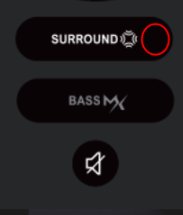
If you are satisfied with the sound quality of the current version, you can continue to keep the corresponding version without upgrading the software.
Otherwise, you can try the different software we offer to choose the one you like.
If you have any questions, please feel free to contact us, thank you for your support!
Buongiorno ho aggiornato il software dalla 139 alla 83
Ma adesso non funzionano né i bassi né il sorround...potete aiutarmi perfavore
Fai un reset della soundbar (tieni premuto il tasto mute per 5s sul telecomando, appare la scritta RST) dopo dovrebbe rifunzionare tutto.
HI. I tried your latest version v139. The only equalization possible for films is EQ2 because in the others it is practically impossible to hear the dialogues correctly. Furthermore the problem is that the dialogues can be heard but all the surround range is lost and in the action scenes the volume remains too high. I would like to know if you could add at least 3 more equalization presets, so that you can choose the best one based on your configuration, given that each equalization profile is not customizable. Thank you.
Pappiccio ho provato a eseguire reset tramite il telecomando...il sub e il sorround funzionano
Ma non mi consente la regolazione sono bloccati a 0 e se premo sul telecomando non si accende neanche la spia sulla soundbar
Pappiccio ho provato a eseguire reset tramite il telecomando...il sub e il sorround funzionano
Ma non mi consente la regolazione sono bloccati a 0 e se premo sul telecomando non si accende neanche la spia sulla soundbar
Su questo nn so, fatte le stesse operazioni tue e con il reset ha funzionato... Prova a disalimentare tutto, soundbar e sub (staccando anche cavo HDMI) per una 10na di secondi, se nn va, scrivi al supporto ultimea.
Hello all,
While trying to update the software version from V 131 to V 139. While downloading the software directly to the USB drive I am getting an error message as below.
please insert the last disk of the multi-volume set and click ok to continue.
So far I have tried three different USB drives. Formatted them etc but it doesn´t seem to help.
Any help would be great.
If you get this on windows you have the cancel the message and just copy it on the drive. Had the same issue before.
Can't downgrade fron v139 to v133. When I insert the pen drive into the USB no installation starts.
Thanks Robin. I tried doing that. Despite that when i connect the USB, it doesn´t start the installation.
When you want to downgrade you have to do this to v109 and name the Zip just update on a fat32 format usb . The it will start automatic .
I also tried 109. It seems impossible for me to downgrade from v139.
Are you sure u have only the update.zip in the main folder?
I tried it again after turning off the system and then put the USB again and then it worked.
Yes. I had installed v133 and v139 the same way. Only the update.zip file in the thumb drive.
Try the v109 or v83 to downgrade . I had at the beginning also trouble but when i control it again it worked
Attualmente non riesco ancora a capire come mai...se faccio il downgrade alla versione di fabrica non funziona più il sorround e il subwoofer.
Ho provato la nuova versione del v139... è migliorato parecchio,ma purtroppo le voci nei dialoghi si sentono sempre ovattate,mentre il resto dei suoni sempre più alti,coprendo completamente il volume vocale e dei dialoghi.
Varricchio,attualmente l'unica soluzione è tenere eq2 che ti permette di sentire i dialoghi con la v139. Ho mandato una mail direttamente ad ultimea per capire se fosse possibile avere altri 3 preset di equalizzazione, per un totale di 6. Una buona cosa sarebbe capire come poter aprire lo zip update per poterci customizzare i valori secondo i nostri gusti.Non sono riuscito ad aprirlo.
Asdren and Prashant, for me is impossible to downgrade independently of the version (i try all the possible,83-109-133).
Nicholas,
Quello zip è un formato particolare.
Contiene uno o più file .bin
Sono firmware compilati, non credo si possa agire "a mano" per aggiustare i valori, l'unica soluzione sarebbe avere una bella form online dove ti scegli i parametri, ti scegli il numero e il valore dei parametri che vorresti e poi ti compila lato server il firmware e te lo scarichi, un po' tipo firmware Marlin per le stampanti 3d, tipo il firmware opensource tasmota per i devices con modulo esp8266 per la domotica e tante altre piattaforme, sarebbe figo, noi potremmo customizzare a piacimento il firmware e l'azienda nn dovrebbe per forza di cose condividere i sorgenti che sono proprietari. Un buon compromesso per tutti ed un bel atto di "condivisione", da parte loro....
Please sign in to leave a comment.